
A manager opens an enterprise application and sees requests awaiting approval. An operations specialist uses the same product to manage assigned tasks. Although they work with familiar interface components, the information and actions available to them reflect different responsibilities.
Supporting these experiences is relatively straightforward when an application has only a few user roles. As the product grows, however, departments introduce new requirements, workflows change and employees take on additional responsibilities. If every variation requires independently developed screens, maintenance becomes increasingly difficult.
The challenge is to accommodate different needs while keeping the application consistent and manageable. That requires a clear separation between reusable interface components, personalization rules and the business logic that controls what users are authorized to do.
Why personalized interfaces become difficult to maintain
Consider an enterprise platform that initially offers a common dashboard and a standard set of workflows. Over time, one department requests additional table columns, another needs different approval actions, and managers want specific indicators displayed more prominently.
Developing separate screens for each requirement may seem efficient initially, but it introduces duplicated functionality. A change to a form might need to be implemented several times, while differences between implementations can make accessibility fixes and component updates harder to maintain.
Multiple responsibilities introduce further complexity. A manager who also performs operational tasks may need information associated with both roles. Applications built around a single, fixed configuration can struggle to accommodate these situations without adding exceptions.
Use a shared Design System
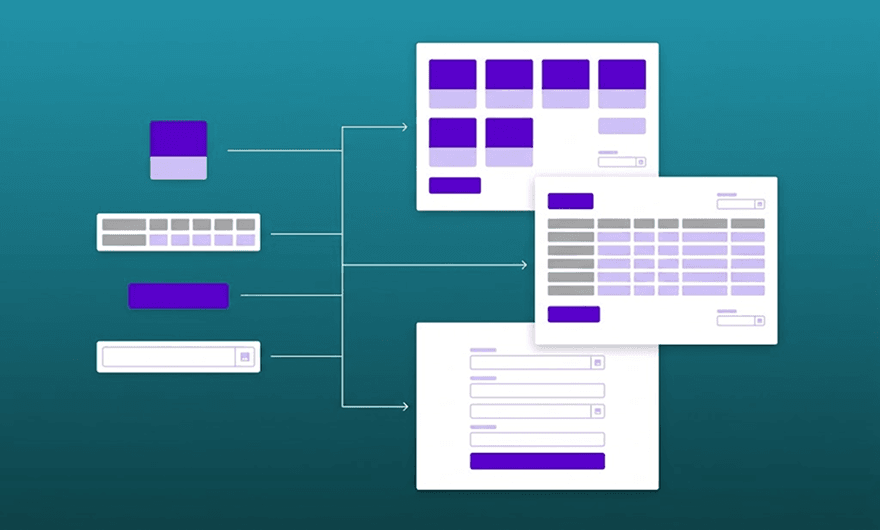
A Design System provides reusable components and interaction patterns that can support different configurations within the same application.
For example, a dashboard card can display different information depending on the user's responsibilities. A table can present role-specific datasets while retaining the same sorting and filtering behavior, and a form can adapt its fields to the current workflow while reusing validation and feedback components.
As discussed in our article on how Design Systems reduce duplicated work, shared components also make maintenance more consistent. Personalized applications build on that foundation by determining which information and interactions each configuration should present.
Consistency remains important. Buttons should behave predictably, form validation should follow familiar patterns, and keyboard navigation must remain reliable across supported configurations. However, reusing accessible components does not guarantee that every resulting screen will be accessible. Components still need to be tested within the workflows where they appear.
Separate presentation from personalization rules
Personalized interfaces are easier to maintain when components are separated from the rules that determine how they are configured. An application might select a dashboard layout based on a user's responsibilities, assigned work and saved preferences. The frontend then renders the appropriate components using that configuration.
When the context changes, the application can update the information displayed without requiring an independently developed screen.
Consider a hypothetical purchasing application. An employee submits a purchase request, which moves to a manager for approval before reaching finance for processing. Everyone works with the same request, but each participant needs different information.
The requester follows its status and responds when additional details are required. The manager reviews supporting documents and makes an approval decision, while finance handles the information needed to process the approved request.
Shared components can support these views, with configuration rules determining which information receives priority and how the interface responds to the current workflow.
Keep authorization and workflow rules separate from the interface
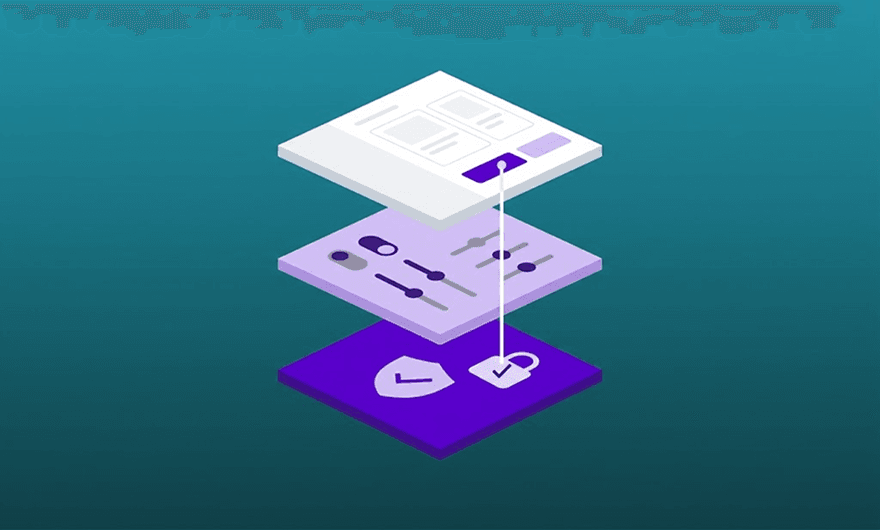
Personalization introduces different sources of behavior that need clear boundaries. Backend permissions determine which operations a user is authorized to perform, while workflow rules establish whether an operation is valid at a particular stage of a process. Both constraints must be enforced when an operation is requested.
Role-based configurations and personal preferences can influence presentation, but they cannot override either constraint.
In the purchasing application, a manager may have permission to approve expenditure, but an approval should only be possible when the request is awaiting that decision. Choosing a compact table instead of dashboard cards must not change which requests can be approved.
Hiding an action in the frontend is not sufficient to enforce security, since the same operation could be attempted through an API or another client. Backend services must validate permissions and workflow conditions independently. This is consistent with the OWASP Authorization Cheat Sheet, which recommends server-side access control checks for each request.
The interface can prioritize relevant actions, while the backend remains responsible for determining whether those operations are permitted.
Test the configurations that matter
Personalization introduces additional scenarios to validate. A dashboard may behave correctly for one role but present incorrect actions when a user has multiple responsibilities or when a request changes state.
Testing should therefore cover representative combinations of roles, workflow states and preferences. Teams need to confirm that users receive the expected information, workflow transitions update the interface correctly, restricted operations are rejected and keyboard interactions remain accessible.
Automated tests can validate defined rules and component behavior, while usability testing helps determine whether users understand the resulting experience. As discussed in our article on accessibility in OutSystems, testing individual components does not replace evaluating the complete interface.
Prioritizing representative configurations helps manage testing effort, but critical authorization checks and high-risk workflow transitions still require explicit coverage.
Plan for long-term maintenance
Every additional configuration creates work for design, development and testing. Exceptions requested by individual departments can become difficult to manage when similar requirements appear elsewhere.
Teams should therefore document personalization rules, define who maintains them and assess whether each variation provides enough value to justify its ongoing cost. Where users have similar needs, a common interface may remain the better choice.
At Mediaweb, UX/UI Design and Frontend Development are considered together when working on enterprise digital products. This helps teams evaluate how changes to the experience affect shared components, application behavior and maintenance.
For teams planning personalized interfaces, the starting point is to identify which behaviors can remain shared and which differences require explicit rules.
Planning a personalized enterprise interface?
We can help you adapt your application to different user needs while keeping development and maintenance manageable.
How should enterprise applications handle users with multiple roles?
Applications should account for the permissions and responsibilities associated with each user rather than assuming everyone has one fixed role. Interface configurations can combine relevant information from different responsibilities, but available operations must still respect backend permissions and the current workflow state. User preferences should affect presentation without changing those restrictions.
How can teams test personalized interfaces without testing every possible configuration?
Teams should identify supported configurations and prioritize representative combinations of roles, workflow states and preferences according to risk. Automated tests can check defined rules and component behavior, while usability and accessibility testing should cover representative user journeys. Critical authorization checks and high-risk workflow transitions still require explicit test coverage.